
Server Updates
You may have noticed we were unusually quiet in March and April 2026 ! However this was not without good reason. Our entire website and everthing connected was moved to a new upgraded hosting provider. The TSMapp also had a separate server upgrade with even more CPU/RAM delegated to TSMapp users. I hope we never have to move hosting providers again…..
DH Racecards - NEW 3x3 Report
The DH Racecards were added to the suite of TSM Features almost a year ago and have been developed and improved since their initial release. There have been 3 iterations of Racecards. Each using different inputs to calculate bespoke rating values.
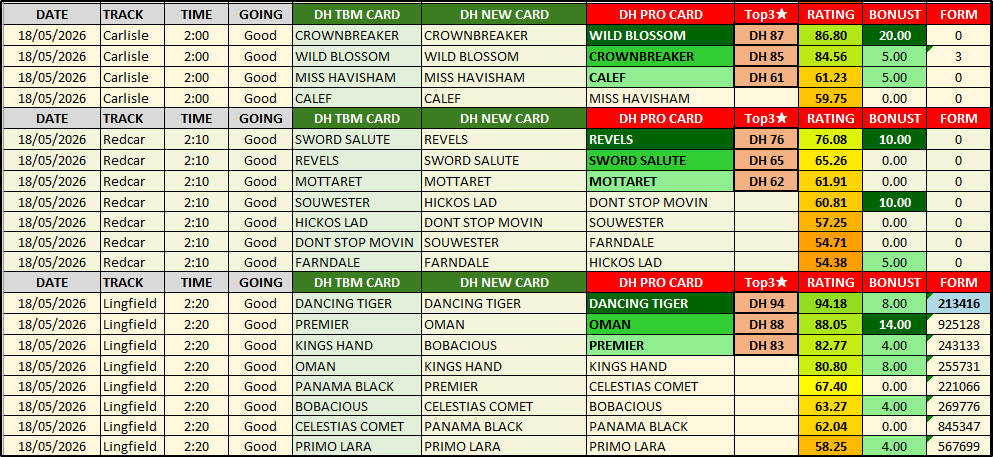
By lining up all 3 cards next to each other Dave H has produced the 3×3 Report. This is a simple spreadsheet that shows the Top 3 Rated Horse for Each Racecard, lined up next to each other. This allows us to pick Horses where there is perceived value as we follow the day’s racing.
The screenshot below is taken from today’s Horse Racing 3×3 Report. There are 3 Racecards available, DH TBM CARD, DH NEW CARD and DH PRO CARD. Each has its own Excel Sheet. Then we have the 3×3 Report as shown below, where we can view the Selections in Rank Order for their respective Racecards. By comparing the 3×3 to the live Market Odds throughout the afternoon we can pick and choose which Markets to play. DH Ratings are about long term value rather than betting on every race.
DH Racecards - BONUS Content
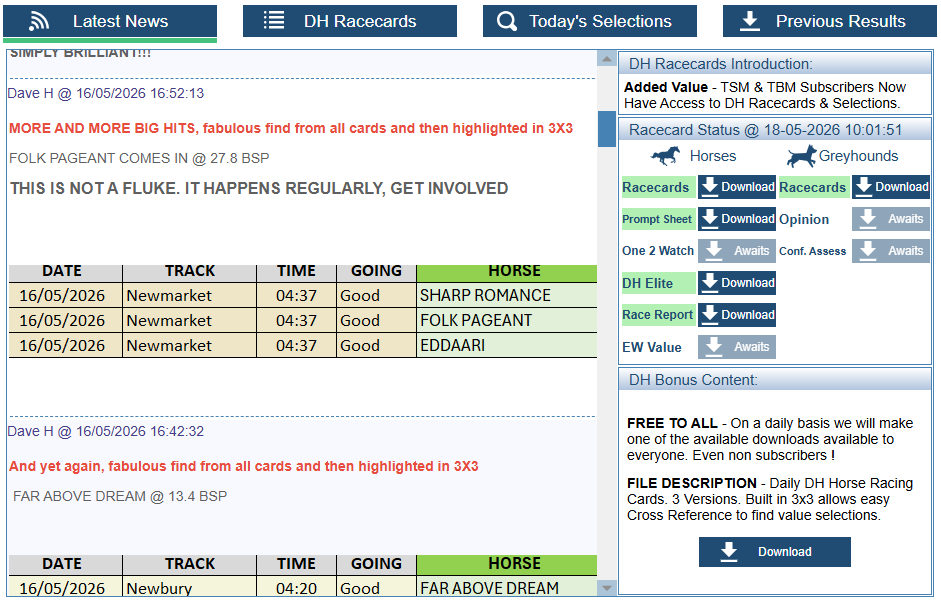
The DH Racecards can be found on the DH Portal. For the sceptical amongst you who are not TSM Subsrcibers we have decided to make some of the content free to use on a daily basis. If you are one of those sceptical people book mark the portal and check back daily ! Today’s Bonus Content was the Horse Racing Racecards including the 3×3.
Horse Racing Selection Hunter Updated
Over the last few weeks our attention has been on adding additional filters to Selection Hunter for Horses and adding more options to the breakdown screen. Creating your own selection systems for Horse & Greyhounds has never been easier. There are now around 200 Filters available for Horse Racing and over 160 Filters for Greyhounds. For a full breakdown see – Horse Racing Glossary & Greyhound Racing Glossary.
Remember, TSM links seamlessly into Selection Hunter so that you can analyse the historical data for any selection systems created.
Additional Filters added were all Last Time Out Filters. The data was updated all the way back to 2021 where possible.
- LTO Distance To First – Distance to first place in lengths.
- LTO Distance to Next – Distance to the next horse in front in lengths.
- LTO Distance To Next Behind – Distance to the next horse behind in lengths.
Distances are always measured in lengths. In Selection Hunter the distance is always shown in numerics. See the table below for a breakdown of distances available.
| Horse Racing Margins | ||||||||||||||||||||||||||||||||||||||||||||||||||||||||||||||||||||||
|---|---|---|---|---|---|---|---|---|---|---|---|---|---|---|---|---|---|---|---|---|---|---|---|---|---|---|---|---|---|---|---|---|---|---|---|---|---|---|---|---|---|---|---|---|---|---|---|---|---|---|---|---|---|---|---|---|---|---|---|---|---|---|---|---|---|---|---|---|---|---|
|
|
|
||||||||||||||||||||||||||||||||||||||||||||||||||||||||||||||||||||
LTO_RaceType was also added to the available Filters. RaceType and LTO_RaceType are derived from the official RaceName of the Horse race. (RaceName will include the type(s) of race).
Use the LIST operator (Comma Seperated List of Values) in Selection Hunter to search for RaceTypes.
Selection Hunter Results Breakdown
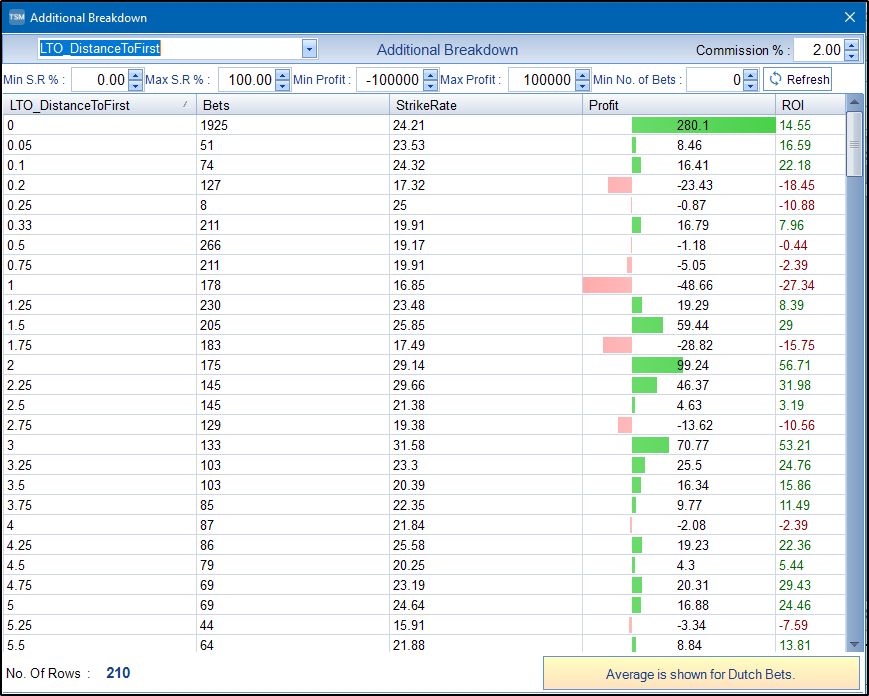
There are now over 85 filters that can be analysed by Selection Hunter on the Analysis/Breakdown Screen so that you can view instantly which values show an edge. Below shows the breakdown for LTO_DistanceToFirst on one of our Selection Hunter presets. We can see instantly that where the Horse finished less than or equal to 0.1 lengths in their last race, the strike rate is around 24%. This may be an option to use this filter for users who want a higher strike rate, but with reduced bets.
The full list of filters now available on the additional breakdown screen are –
| Additional Breakdown Filters | |||||||||||||||||||||||||||||||||||||||||||||||||||||||||||||||||||||||||||||||||||||||
|---|---|---|---|---|---|---|---|---|---|---|---|---|---|---|---|---|---|---|---|---|---|---|---|---|---|---|---|---|---|---|---|---|---|---|---|---|---|---|---|---|---|---|---|---|---|---|---|---|---|---|---|---|---|---|---|---|---|---|---|---|---|---|---|---|---|---|---|---|---|---|---|---|---|---|---|---|---|---|---|---|---|---|---|---|---|---|---|
|
|
|
|||||||||||||||||||||||||||||||||||||||||||||||||||||||||||||||||||||||||||||||||||||
TSM Desktop & TSMapp (Web Based)
Even if you have no use for Selection Hunter, TSM is still the only software you need to record and analyse your betting. With 46 Staking Plans included, all with editable settings you can pretty much create any staking plan out there.
With in-depth analysis, graphs and reports easily look at your historical bet data. Find your own edge.
Remember one (1) subscription covers access to both TSM V8 (Desktop) and the TSMapp. (Web Based).
Everytime you login to the TSMapp (Web Based) you will be using the latest version of TSM. If an update is needed, TSM V8 Desktop Software will auto update when you next use it.
Other Updates Over The Last 2 Years
- Additional Staking Plan Settings added to XYZ, SAW, iTSM
- Back & Lay Variable Dutch Calculator and Expected Losing Sequence Calculator – Previously only available as a separate web application. Now fully integrated for TSM Subscribers only. Access from the Calculators Tab. Learn More Here.
- Graphs – Moving Strike Rate Graph Added.
- Auto Dutch on either the Spare 1 or Spare 2 column. This works by checking each bet and then scanning the next row ahead. If the data is identical then the TSM will assume they are bets that have been placed in the same market.
- Auto Add Last Bet <LB> Codes – On the Data Manipulation Tab – Option added to ask TSM to add codes automatically to the Selection Column based on the Date Data in Spare 1 or Spare 2 Columns.
- Reports Added – Part of the Analysis Tab. Reports allow us to break down our main data using various criteria. If we have data in our Spare 1 and Spare 2 Column then we can use that data. Hard coded is Odds Ranges, Race Course, Race Type, Distance and Date.
- TSM Auto Results Feature added. Quickly find and update bet results for UK/IRE Horse Racing and UK Greyhound Racing. Accessed through the Main Grid Context Menu. Right Click over the selected row to bring up the Context Menu. Learn More Here.
- Sort on Spare1, Spare2 or Selection Column. On the Data Manipulation tab there is an option to Sort in either a String, Numeric or Date format. If data is found in the column with an incorrect format the sort will be aborted. Use the Undo Button on the main grid to reverse any sorting if needed.
- Selection Hunter Updates –
Filters added to Selection Hunter For both Horse AND Greyhound Racing. 200+ Horse Racing Filters to choose from and over 160 Greyhound Racing Filters to choose from.
Selection Hunter For both Horse AND Greyhound Racing – Undo/Redo Option Added when creating queries/systems. Every time a query is run/loaded/reset the previous settings are saved
Selection Hunter For both Horse AND Greyhound Racing – Option to Copy Daily Query Results to Computer Clipboard Added.
Features Only Available in TSM V8
- Virtual Files – Load and Save Files to the TSM Server in both TSM V8 and TSMapp. This makes the versions of TSM completely interchangeable. For instance, you could start the day on your desktop in TSM V8. Save your bet data. Then in the afternoon on your work computer, you could use the TSMapp and carry on where you left.
- Extensive Tutorial Videos – There are now 13 in-depth video tutorials covering everything you need to get started. https://thestakingmachine.com/videos/
- Dual Input – Type directly into TSM or add bets individually in a pop-up dialog. You no longer need to change view to do this. This makes a more intuitive user experience and keeps things simple. This is the same for the TSMapp which previously you could not type directly into. Drag n Drop bet rows also added to increase usability even further.
- Generate Reports – If you have included extra data in the Spare Columns, you can now generate Reports based on this data. For instance, if you have included Date, Race Course or Race Type you can look at the profit for each category.
- Advanced Filters – In conjunction with Generating Reports you can now filter on these categories. This allows you to really drill down into your data and find that edge.
- UK/IRE Horse Racing & UK Greyhound Racing Racecards – Available in both versions of TSM. Racecards include Merlin Rating and Predicted Rank (In House Ratings formally part of The Bet Machine (Automated Betting Sister Software)
Features Only Available in TSM V8
Demo/Trial Versions also exist for anyone who wants a quick look without subscribing. Both versions are limited to 10 bets at any one time when used in evaluation mode.
Download TSM V8 (Windows Desktop) and Access the TSMapp (Web Based) via


